How to make product demo videos easier for search systems to understand
A product demo can look polished, explain a real feature, and still fail the most basic discovery test: can someone understand what it covers before pressing play? Too many demo pages answer that question with a thumbnail, a player, and a title such as “Platform walkthrough.” The missing context leaves visitors guessing, and it gives search systems very little dependable evidence about the video’s subject.
That gap matters most for demos, tutorials, and webinar recordings. A viewer may arrive from a search result without knowing your product. They need enough context to judge whether the video addresses their job, their problem, and the outcome they want. Search systems face a similar problem. They can process technical signals, but vague labels and thin page copy create ambiguity.
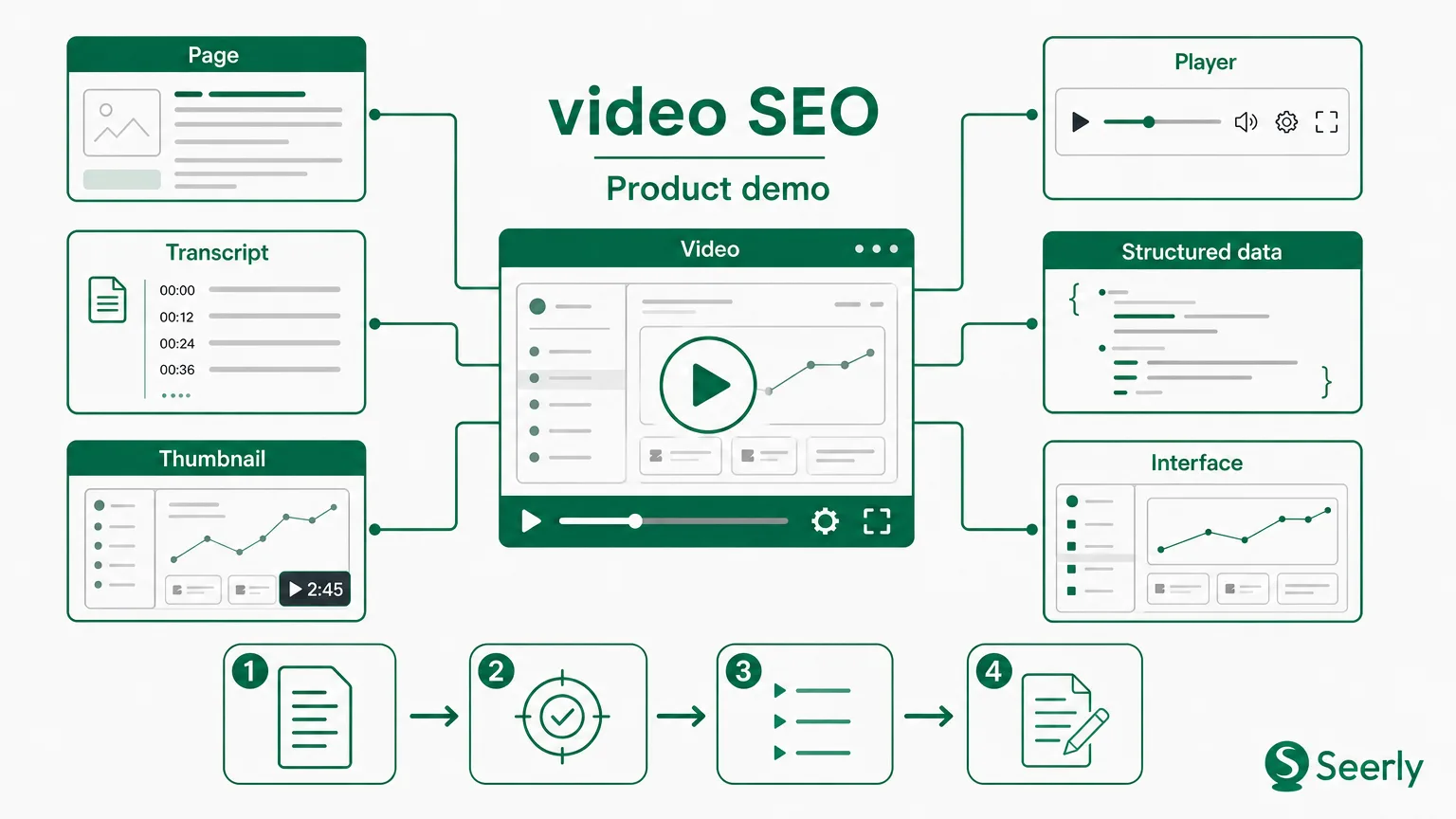
Good video SEO is not a metadata scavenger hunt. It is editorial alignment. The demo, transcript, page copy, chapter labels, thumbnail, and structured data should describe the same feature and the same audience need. Get that right, and a video page becomes useful product evidence instead of a lonely embed.
What information does a product demo need before it can be understood out of context?
Start with the awkward version most teams have seen.
Title: Product demo
Summary: See our platform in action.
Video: 12-minute screen recording
Page copy: None
A viewer can’t tell what feature appears in the recording, who should watch, or what changes after they use it. The page may technically contain a video, but it lacks a useful proposition. “Platform demo” could mean anything from user permissions to billing setup. That ambiguity is the enemy of video SEO.
Now compare it with a page built around a specific viewer need:
Title: How marketing teams can review AI search mentions in Seerly
Summary: A 9-minute demo for product marketers who need to track how AI-generated answers describe their brand. It shows how to group prompts, inspect recurring brand claims, and flag pages that need factual review.
Feature shown: Prompt monitoring and brand-mention review
Use case: Reviewing inconsistent product claims before a campaign launch
Outcome: A prioritized list of pages and claims to check with the product team
The second version does not need clever copy. It needs specificity. Before pressing play, a person should understand the audience, feature, use case, and likely result. A search system needs the same evidence in crawlable text.
Build the six-field brief before recording
Give every product video a short brief with six fields:
-
Title: Name the capability and the user’s task. “Create a report” is weak; “Create a weekly AI search mention report” is far clearer.
-
Summary: State what the recording covers in two or three sentences, including the condition that makes it relevant.
-
Audience: Name the role or team, but don’t make the label vague. “Marketing teams” works better when paired with a real responsibility.
-
Feature shown: Use the current product name, exactly as it appears in the interface.
-
Use case: Explain the practical situation that prompts someone to open the video.
-
Outcome: Say what the viewer will know, create, or decide after watching.
The thing is, the brief also catches weak videos before production spends hours polishing them. If no one can write a clear use case or outcome, the recording may be feature footage without a story. That is a content problem, not an SEO problem.
How transcript and page copy strengthen a video’s meaning
Auto-generated transcripts are a starting point, not finished page content. Product recordings include brand names, UI labels, acronyms, and half-spoken instructions such as “click that thing on the left.” Left untouched, those transcripts can turn a good explanation into a messy block of text.
Google’s guidance says that a video needs a dedicated watch page where the video is the main content and can be indexed. It also recommends descriptive titles and descriptions that communicate what the video covers. Google’s video appearance documentation is direct on this point: the surrounding page matters.
Turn spoken explanation into page-level evidence
I prefer a four-pass workflow because it separates accuracy from polish.
-
Create the raw transcript. Export captions from the hosting platform or speech-to-text tool. Keep timestamps, speaker changes, and the original wording at this stage. The raw file is useful for quality checks later, especially when someone disputes a feature claim.
-
Edit for product accuracy. Correct feature names, UI labels, customer terminology, and numbers. Remove verbal clutter such as false starts, but do not rewrite the speaker into a different promise. If the presenter says “you can review a claim,” the transcript should not become “the system automatically fixes every claim.” That small rewrite changes the product statement.
-
Add chapter summaries. A chapter title should name the task, while the sentence beneath it explains why that step matters. “03:12 - Review recurring product claims” gives orientation. “Compare repeated claims across prompts, then send questionable wording to the page owner for review” gives meaning.
-
Write supporting copy beside the player. Add a short introduction above the video and an explanation below it. The page should mention the intended user, the feature, the starting condition, and what the viewer will leave with. Keep the copy honest about limits, too.
Here’s a useful page pattern:
-
Above the player: A two-sentence summary that answers “who is this for?” and “what will they learn?”
-
Below the player: A short explanation of the workflow shown, followed by the transcript and chapters.
-
Around related links: Links to documentation, a product page, or a next-step article that gives the video a place in the buyer’s research path.
Supporting copy should not repeat the transcript word for word. It should clarify the parts that are hard to catch in a screen recording: why a setting matters, what prerequisite exists, or when the workflow is a poor fit. A webinar recording may need more editorial work than a five-minute demo because conversations wander. That’s fine. Cut the noise in the written companion, not the truth.
For teams working through broader visual-asset publishing questions, Seerly has also written about how video context supports discovery beyond a blog post. The lesson carries over neatly: a media asset needs readable context around it.
Which structured details should match the visible video page for video SEO?
Markup cannot rescue a page that says one thing while the player says another. Treat structured data as a machine-readable mirror of the public page, not a hidden second description of the asset. Google’s structured data policies require markup to represent visible page content accurately and warn against misleading or irrelevant fields.
Use VideoObject details that match what a visitor can verify. More properties do not make a vague page clearer. Mismatched properties can make maintenance miserable.
| Detail | What visitors should see | What structured data should state | Common mistake |
|---|---|---|---|
| Title | The exact video title near the player | The same title, with no extra promises | Markup says “Complete guide” while the page says “Demo” |
| Description | A plain-language summary of the recording | The same subject, audience, and use case | Copying a generic channel description |
| Thumbnail | A current image from the recording or an honest cover frame | The exact thumbnail URL used for the video | Using a thumbnail from an older interface |
| Upload date | A displayed publication date where relevant | The real uploadDate | Updating the page and silently changing the original date |
| Duration | A visible runtime or player duration | The actual ISO 8601 duration | Leaving a length from an earlier edit |
| Key moments | Chapters that viewers can click or read | Timestamps and labels matching the final cut | Chapter times that no longer match after trimming |
Key moments need special care. They only help when timestamps map cleanly to the live recording and labels describe the content at that moment. “Dashboard” tells a person almost nothing. “Filter AI search prompts by brand claim” tells them whether that section is worth their time.
Look, the player is the source of truth for runtime and video content. The page is the source of truth for context. The structured data should agree with both. When video SEO services audit pages, this alignment check should come before any debate about adding more fields.
How do you stop an older demo from becoming misleading product evidence?
A demo ages faster than its view count suggests. A renamed navigation item can confuse a viewer. A discontinued workflow can create support tickets. An old transcript that promises a capability no longer sold is worse because it creates a written record of a claim your team no longer stands behind.
I’ve seen teams treat a recording as permanent once it is published. That works until a product update changes the first three clicks and a prospect follows the old route during a live evaluation. Not ideal.
Use two review moments, not one
Run a pre-publication review before the page goes live:
-
Check the UI against the final recording. Confirm labels, menu paths, and defaults match the release version. If a final update arrives after editing, reshoot the affected segment or state the version clearly.
-
Check names and claims. Product marketing should compare spoken promises, transcript wording, chapters, and page copy against current packaging and approved language.
-
Check metadata against the final export. Video production should confirm the thumbnail, duration, captions, and timestamps after the last edit.
-
Check the live page. The web owner should test the player, mobile rendering, indexability, and the structured details on the actual published URL.
Then schedule a post-release review. Product teams already know when a major UI revision, feature rename, or retirement ships. Add a video inventory to that release ritual. Flag every recording that mentions the changed area, then choose one of four actions: keep, annotate, update, or retire.
A useful annotation is specific: “Recorded in March 2026. The Monitoring tab is now called Reviews.” A vague “interface may vary” note reads like an escape hatch. If the workflow no longer exists, unpublish the video or replace it. Don’t leave inaccurate product evidence circulating because the view count looks healthy.
What does a reusable video-publishing handoff look like?
Publishing breaks down when everyone assumes someone else checked the details. Product marketing knows the message. Video production knows the edit. The web team knows the publishing system. SEO owners know how content is discovered. None of those roles can safely rubber-stamp the whole page alone.
Use a compact handoff document with named owners and approval criteria.
| Owner | Approves | Questions to answer before launch |
|---|---|---|
| Product marketing | Audience, use case, outcome, product claims | Does the page describe a real customer problem and the current product position? |
| Video production | Final cut, captions, thumbnail, chapter timing | Do the interface, spoken claims, and timestamps match the final export? |
| Web owner | Player setup, page copy placement, canonical URL | Can a visitor watch the recording and read the supporting context without friction? |
| SEO owner | Title, description, transcript placement, VideoObject fields | Do visible content and structured details tell the same story? |
One person should own the final “publish” decision, usually the page owner. That person does not need to personally validate every field. They need a recorded sign-off from each owner, plus a date for the next accuracy review.
The handoff becomes far more useful when teams keep a source-of-truth column. Put the approved title, summary, feature name, duration, thumbnail URL, transcript file, and review date in one place. A shared sheet works for a small library. A content system becomes worthwhile once recordings multiply and updates arrive every week.
If competing reports produce conflicting assessments of a page, borrow the discipline in Seerly’s manual review workflow for tool disagreements: inspect the underlying page evidence before treating a dashboard label as fact. Video publishing has the same trap. A green checkmark means little if the transcript still describes last year’s interface.
Frequently asked questions about YouTube video SEO and product demos
Does YouTube video SEO replace a dedicated product page?
No. A YouTube description can help people browsing within YouTube, but it does not replace a detailed page on your own site. Host or embed the recording where the feature, audience, use case, and supporting explanation can appear together. Then keep the YouTube title and description consistent with that page.
Should every product video have a full transcript?
For demos and educational recordings, yes, unless legal or privacy limits prevent publication. A cleaned transcript gives viewers a way to scan the content and gives your team a reviewable record of product claims. Long webinars may need an edited transcript with clear speaker labels and chapters.
How often should teams review old demos?
Review after any release that changes the workflow shown, renames a feature, or changes a claim. A quarterly inventory check catches quiet drift in high-value recordings. Older videos with steady traffic deserve attention first because more people may rely on them.
Do video SEO services need access to the product team?
They do if they are auditing product demos seriously. Outside specialists can inspect page context and markup, but only product owners can confirm whether a workflow still works as shown. Without that input, an audit may improve technical details while leaving the central claim wrong.
Start with one demo, then make the process routine
Pick one high-value demo this week. Read its title without watching, scan its page copy, compare the transcript with the current product, and check whether its structured details match the visible page. You may find a small fix. You may find that the video needs retirement. Both outcomes are useful.
Then turn the work into your default publishing checklist. The goal is not more metadata for its own sake. It is a video library where every public recording makes an accurate, legible case for a real product capability.
Want a better way to connect content quality with trusted discovery work? Learn more at Seerly.