Why the Google keyword rank your team sees may not match what customers see
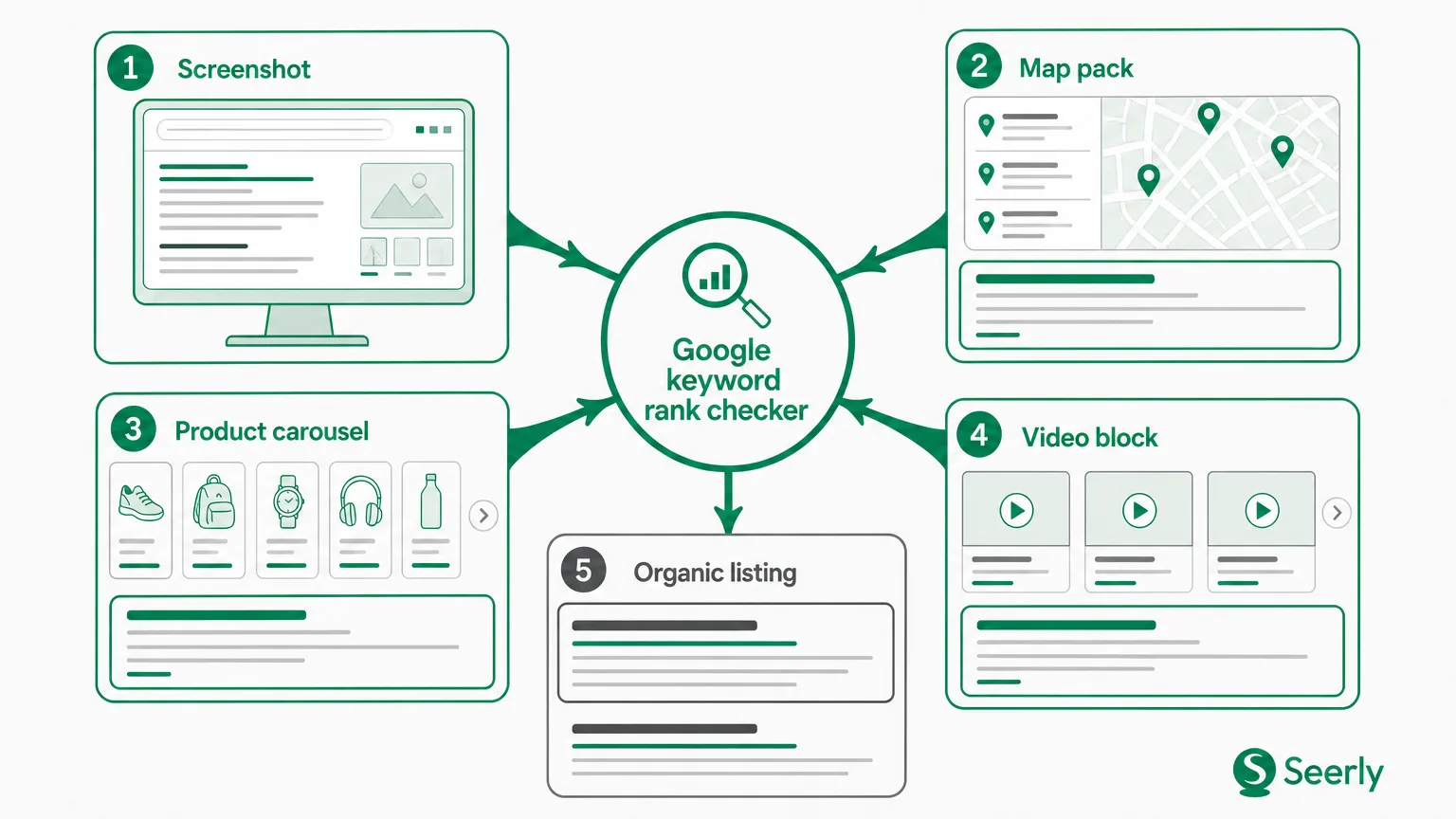
A marketing lead sees position 4 in a Google keyword rank checker. A sales colleague searches the same phrase from their phone and can’t find the page until position 11. Then a customer sends a screenshot where a map pack, product carousel, and video block sit above every standard result.
Three people. Three versions of “the ranking.” Nobody has to be wrong.
I’ve seen teams react to this moment by rewriting a page within hours, escalating a tool dispute, or reporting a drop that existed only in one search context. That’s expensive activity built on a thin slice of evidence. Google’s own guidance notes that search results can vary based on factors such as location, language, device, and prior activity, so an individual search result is not a clean audit of a page’s standing.
A reported position is a measurement. A customer’s screen is an experience. Treat the gap between them as a clue worth checking, not a verdict on your page or your tracker.
What a Google keyword rank checker measures
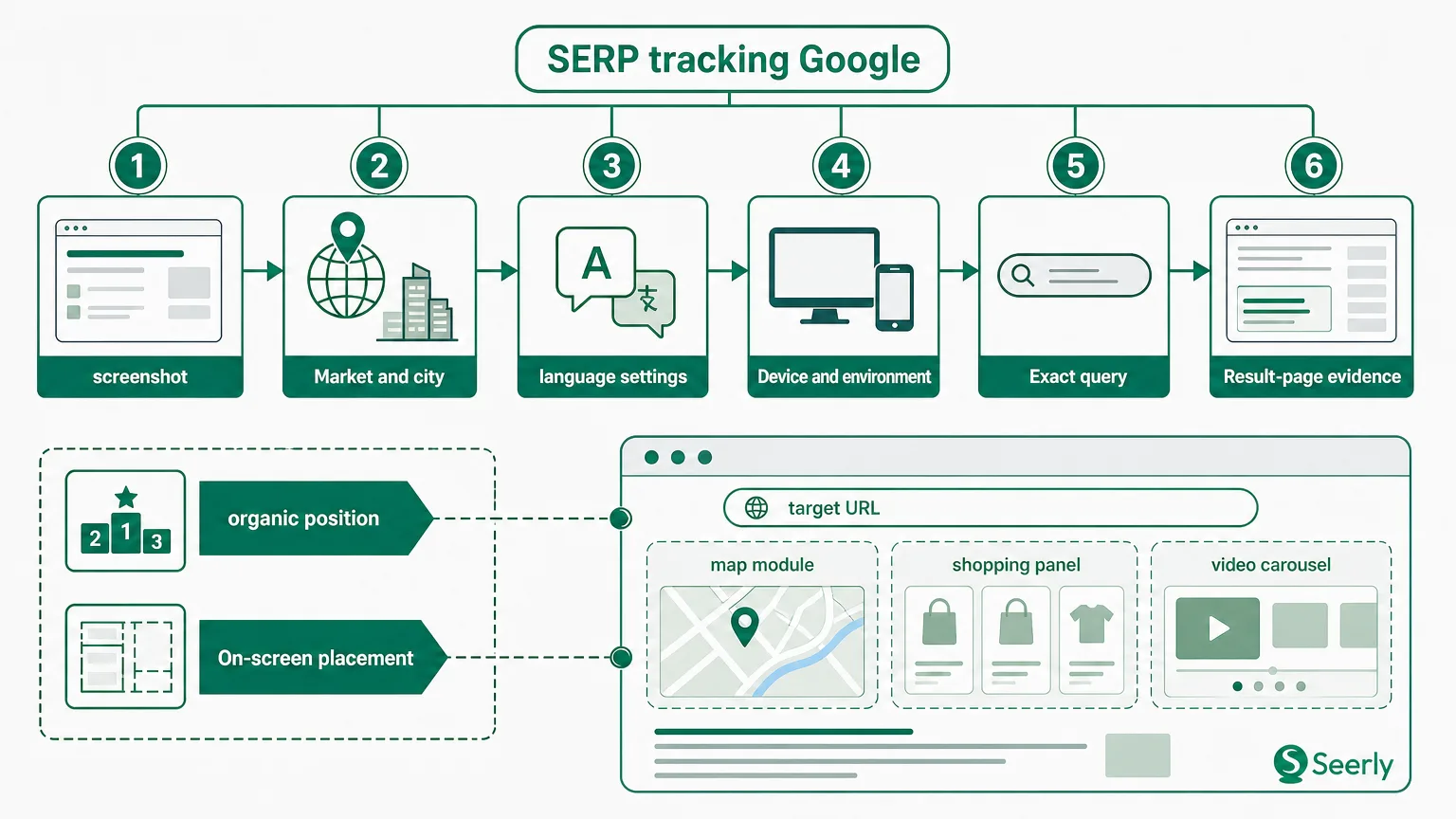
A Google keyword rank checker tool records where a specified URL appears for a specified query under defined conditions. Those conditions often include a country or city, desktop or mobile results, a language, and a scheduled collection time. The real value sits in that control: it lets a team compare Tuesday with last Tuesday without every person’s browsing history muddying the picture.
Definition: A tracked position is the placement of a result for one query, location, device, language, and time. It is not a promise that every person will see the same result in the same place.
An individual search carries more baggage. Google may infer location from the device, detect language preferences, interpret a slightly altered query, or arrange the page around result features that push standard listings lower on the screen. Someone searching “emergency plumber near me” at 7:30 a.m. gets a different kind of results page than a tracker checking “plumber” for a whole country at 2:00 a.m.
The distinction gets sharper when teams compare rank data with Search Console. Search Console reports aggregated impressions, clicks, and average position across actual Google Search activity, and its Performance report documentation explains the dimensions used to group that data. It answers a different question from a rank tracker: “What happened across recorded searches?” A tracker asks, “Where did we appear in this repeatable test?”
Neither view wins. Together, they make a better record.
Why two people can see different Google results
A Google keyword rank checker online may look simple, but the result it returns belongs to a precise set of settings. Before calling a discrepancy a problem, check the ordinary variables that make two screens diverge.
-
Location changes the candidate set. A person in Manchester and a tracker set to the United Kingdom may both search the same phrase, yet the person’s local intent signals can surface nearby businesses or regional pages. For local queries, city-level settings matter far more than a country setting.
-
Device changes the layout. Mobile screens can show more visual modules, local results, shopping placements, or expandable panels before the first standard listing. The URL may hold the same underlying organic position but appear much farther down the physical screen.
-
Language changes interpretation. Browser language, Google interface language, and query language can point Google toward different pages. A multilingual site may rank with one URL for an English-language search and a different URL for a French-language search.
-
Query wording is rarely identical. “Best running shoes,” “best running shoe,” and “best running shoes 2026” sound close in a meeting. Search systems don’t have to treat them as one request. Quotation marks, “near me,” punctuation, and added modifiers all matter.
-
Timing catches moving results. Fresh news, stock changes, holiday demand, index updates, and competitors publishing new pages can alter results quickly. Google maintains a public Search Status Dashboard for confirmed incidents affecting Search, which is useful when a broad, sudden change appears across many tracked terms.
-
Result-page features alter what people call rank. A featured snippet, local pack, image block, or AI-generated element may occupy prominent space. Count what your tool counts, then separately record what a human sees above the listing. Big difference.
The thing is, “position 3” can describe a listing’s order among organic links while saying nothing about its pixel depth on a phone. Both measures have uses. Confusing them causes most of the argument.
A verification protocol before you touch the page
A disputed result needs a small case file, not a hurried content refresh. Start with the report that triggered concern, then gather enough context to reproduce the claim as closely as practical. Save the evidence before checking again, because the page may change while people debate it.
-
Record the exact query and the tracker settings. Copy the phrase rather than retyping it. Write down device, country or city, language, search engine domain, date, collection time, reported URL, and reported position. If the result came through a Google keyword rank checker API, retain the request parameters and response timestamp too.
-
Reproduce the observed context. Ask the person who saw the different result for their screenshot, device, approximate location, language, and exact wording. Then test that setting in your tracker where possible. A private browser window can reduce personalisation, but it does not turn a local mobile search into a national desktop test.
-
Inspect the page composition. Count organic listings separately from ads and features. Note whether the tracked URL ranks but sits below a local pack, shopping module, video results, or a long answer panel. Screenshot the whole useful portion of the page, not only the brand result.
-
Compare the same dates. A tracker’s 9:00 a.m. reading and a customer’s search three days later answer different questions. Look at several collection points, Search Console impressions and clicks, plus any visible competitor movement. Google’s Search Analytics API documents available dimensions such as query, page, country, and device, which helps teams pull comparable slices rather than relying on a single blended number.
-
Keep the exports. Store screenshots, tracker exports, and a short note in one shared folder. Six weeks later, the screenshots will settle a debate that memory won’t.
One check rarely settles anything. A pattern does.
Diagnose the discrepancy without guessing
Suppose the tracker reports position 5 on desktop in London, while a customer on mobile in Birmingham sees the page much lower. That pattern points to configuration or result-page composition before it points to a weak page. Don’t start with copy changes.
Use this decision path:
Do settings differ? If query, location, language, or device differs, align them and retest. A repeatable gap that disappears after alignment is a measurement-setting issue. Update the tracked configuration and label the old series so nobody compares mismatched histories.
Do settings match, but the page looks different? Inspect features above the organic results and identify which URL ranks. If the same page remains in a similar organic order but a large local module appears, the change is about the result page. Track organic rank and screen prominence as separate fields.
Did the search intent change? When Google begins favouring guides instead of category pages, videos instead of articles, or local businesses instead of national brands, inspect the current top results. A shift in page types across the first page points to intent change. Read Google’s explanation of ranking systems before drawing a neat cause-and-effect story from one update.
Does the page fall across matched contexts and dates? Now investigate page performance. Check index status, the ranking URL, query-to-page fit, and whether close competitors moved too. If several important terms decline while competitors gain, that deserves a page-level review. If only one volatile term flickers, patience is often cheaper.
I’m not 100% sure every ranking dispute needs the same threshold. But I am sure a forced rewrite based on a single screenshot creates more noise than insight.
When to change settings, update a page, or wait
The right response depends on consistency, commercial importance, traffic effects, and the competitive pattern. Rank alone lacks enough context to set the priority. Use a simple matrix during weekly reviews.
| Evidence pattern | Likely response | What to do next |
|---|---|---|
| One-off mismatch, settings differ, no traffic change | Measurement issue | Correct the tracking context and annotate the report. |
| Same ranking across several checks, but more result features above it | Search-page change | Track screen prominence, not only organic placement. |
| Matched settings show a sustained decline on a high-value query, with clicks or impressions falling | Page review justified | Audit the ranking URL and compare the current top results. |
| Several competitors fall together, with no click impact yet | Wait and monitor | Collect another week or two of matched observations before changing content. |
“High value” needs a local definition. A two-position fall on a term that feeds qualified leads deserves faster attention than a seven-position wobble on a phrase with no meaningful visits. Search Console’s data can help here, though Google notes that data is aggregated and subject to filtering and processing rules. Pair it with your own conversion records rather than treating average position as revenue.
Competitor movement helps separate an isolated page issue from a broader shift. If your URL and four rivals all move down after a feature appears, rewriting only your title tag won’t fix the page layout. For teams reviewing launches or redesigns, keep a site migration ranking baseline before changing anything major. You can’t diagnose a change without a credible “before.”
Record the finding so the dispute stays solved
Monthly reporting arguments repeat when the evidence disappears. Create one short record for every disputed keyword that merits follow-up. It doesn’t need a grand process. A shared spreadsheet, ticket, or report note works fine.
Use these fields:
-
Context: query, URL, device, location, language, dates, tracker position, and observed position.
-
Hypothesis: configuration mismatch, result-page feature, intent shift, or page decline.
-
Evidence: screenshots, exported rank data, Search Console slice, and notes on competitors.
-
Decision: change tracking settings, review the page, or wait for more observations.
-
Owner and validation date: name one person responsible, then set the next check date.
Write the conclusion in plain language. “The desktop UK tracker and mobile Birmingham search used different contexts; no page change planned” is better than “ranking variance observed.” It tells the next person what happened and why the team chose not to act.
A shared standard also reveals recurring issues. Maybe sales keeps testing local mobile results while reports track national desktop results. Maybe a certain query attracts feature-heavy pages every Friday. You can then adjust monitoring rules, rather than relitigating the same screenshot every month. For a related review of why ranking alone may not settle performance questions, read whether a site ranking in Google is actually working.
Frequently asked questions about rank discrepancies
Is a manual Google search more accurate than a tracker?
No single manual search is inherently more accurate. It is accurate for that person’s moment, device, language, location, and query wording. A tracker is accurate for its stated test conditions. Use manual searches to understand customer experience, and use controlled tracking to compare changes over time.
Can a Google keyword rank checker API report a different number from a dashboard?
Yes. Check the API request settings, collection time, result count, and any filters before assuming a fault. API-based workflows also face documented Search Console quota limits, so failed or delayed data pulls should be visible in reporting notes.
How long should we wait before changing a page?
For a low-impact query with no traffic loss, collect several matching checks over at least a week. Move faster when a high-value query shows a repeatable decline across matched contexts and a related fall in clicks or qualified visits. Evidence first. Then action.
Your next disputed position is a chance to build a better habit. Run the protocol, save the evidence, state the decision, and turn the result into your team’s standard for future rank investigations. Learn more about measurement-led search monitoring at Seerly.