Does Your Website Need a Rebuild for AI Discovery or Just a Better Audit?

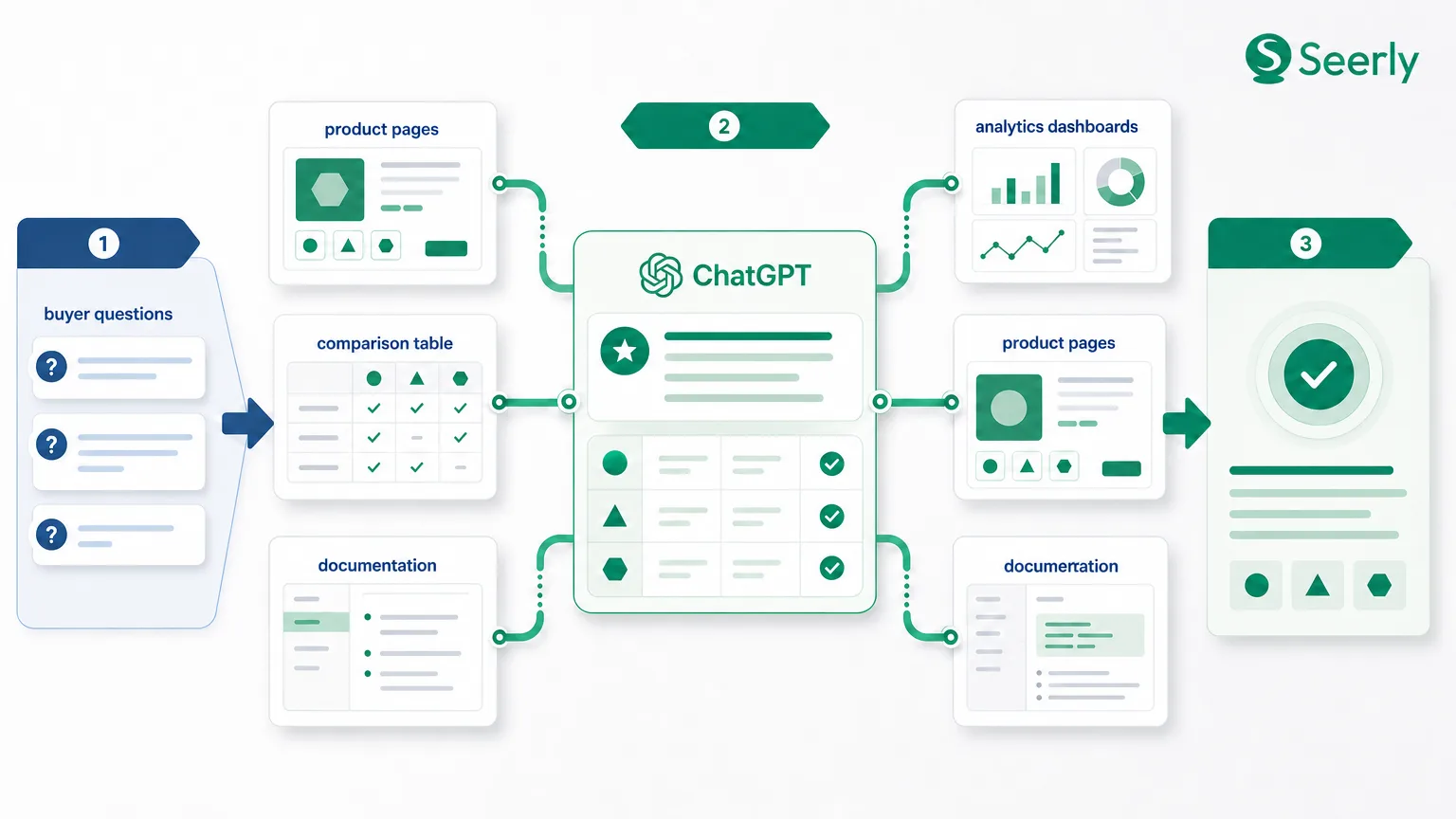
If you search Reddit, founder Slack groups, or B2B marketing communities right now, you will see the same question repeated in different forms: do we need to rebuild our website so AI tools can find us? That concern is understandable. Teams are watching buyers use ChatGPT, Perplexity, Google AI Overviews, and other answer engines earlier in the research process, and they worry their current site architecture is invisible to those systems.
In most cases, though, the rebuild question is the wrong starting point. When teams check website SEO for AI-era visibility, the issue is usually not that the CMS is outdated or the design system is fundamentally broken. It is more often that important pages are hard to crawl, weakly structured, thin on direct answers, or impossible to evaluate because measurement is missing. Even for traditional search, the basics are still not consistently handled well: one industry roundup reports that technical SEO problems remain among the most common causes of lost organic performance, while another notes that small businesses still underinvest in structured, ongoing SEO improvements.
That distinction matters because a rebuild is expensive, slow, and risky. A targeted audit, by contrast, can help you decide whether you have a technical problem, a content-structure problem, or a visibility-measurement problem. For smaller SaaS teams in particular, that is usually the faster route to actionable intelligence and better discoverability.
The rebuild myth: why this fear is growing now
The myth is simple: if AI systems are changing how people discover software, then your existing website must be obsolete. Reality is messier. Answer engines do not reward a glossy redesign by default. They reward pages they can access, parse, summarize, and trust. A brand-new site with vague copy and weak evidence can still underperform, while an older site with clear information architecture can surface well.
Why is the rebuild myth getting louder now? First, buyers are changing behavior. Search and answer experiences are blending, and vendors are seeing traffic patterns become less linear. Second, teams are noticing a new kind of gap: a page may rank decently in classic search but still rarely appear in AI-generated answers. That creates anxiety because the problem feels invisible. Third, many marketers still lack agreed standards for AI-ready content audits, so “rebuild everything” becomes a convenient but expensive default.
The data supports a more disciplined response. Broad SEO studies continue to show that technical quality and page performance affect visibility and user outcomes. For example, slow-loading pages are still associated with weaker engagement and conversion performance, and web performance issues continue to create measurable friction across devices. But those findings do not automatically mean “start over.” They mean you should diagnose what is actually broken before you redesign what is not.
The three real causes of weak AI discovery
When you check website SEO through an AI discovery lens, most issues fall into three buckets.
1. Inaccessible or weakly structured pages
Some pages simply cannot be read or understood cleanly. They may be blocked by robots rules, hidden behind scripts, overloaded with visual elements and light on text, or structured in a way that obscures page purpose. A homepage that says “reimagine your workflow” with no direct explanation of product category, user, or use case is a classic example. It may look polished, but it gives answer systems very little to work with.
This is not only an AI issue. Multiple technical SEO surveys suggest that crawlability, internal linking, and on-page structure still shape whether content can be discovered and processed efficiently. If the core information is hard to extract, you do not need a rebuild first. You need better source structure.
2. Thin comparison-ready content
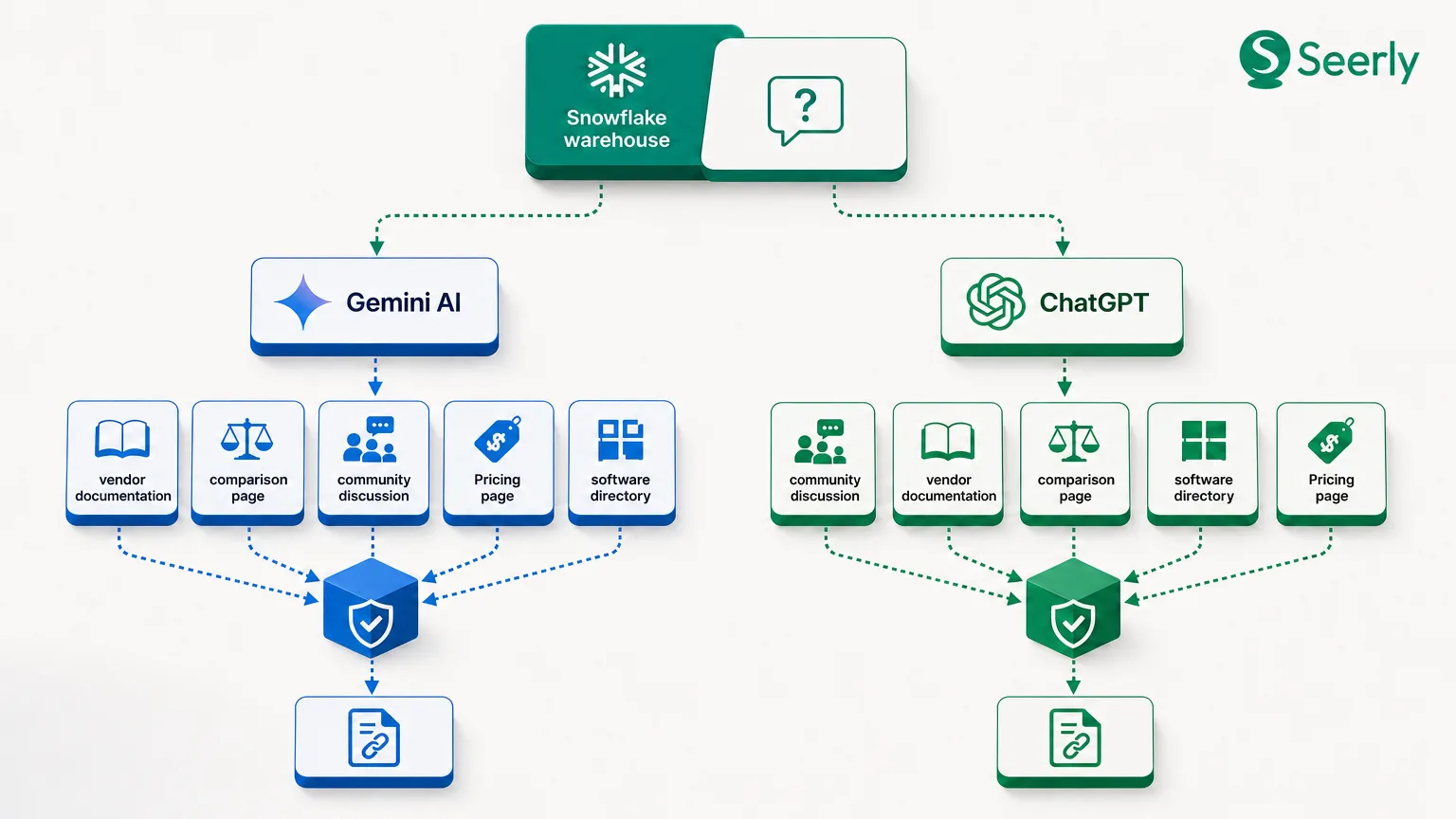
Many SaaS sites have product pages that describe features but do not answer the questions buyers actually ask. They avoid explicit category language, omit competitor comparisons, skip implementation context, and provide little evidence. AI systems often respond to high-intent prompts such as “best tools for X,” “Y vs Z,” or “software for A teams with B requirement.” If your site never addresses those questions directly, it becomes harder to cite or summarize.
This is where content depth matters. A page can be “SEO-friendly” in the old sense and still fail at answer extraction. If it contains keywords but no concise summary, no proof points, and no context for when the product fits, it is not especially useful for machine-mediated discovery. That is why citation-ready website structure matters more than design novelty.
3. Lack of measurement
The third problem is operational, not architectural. Many teams cannot tell whether they have an indexing problem, a content problem, or simply a tracking blind spot. They watch branded traffic and rankings, but not whether solution pages are being surfaced in prompt-based discovery or whether page edits improve mention rates over time.
Without measurement, every visibility issue feels like a structural failure. In reality, you may have pages that are technically fine but poorly framed, or pages that are strong but disconnected from core solution hubs. If you cannot observe discoverability at the page and prompt level, decisions become guesswork rather than informed decisions.
A practical audit sequence you can run before any rebuild
A useful audit for AI discoverability should move from technical access to semantic clarity to proof and linking. This sequence helps you check website SEO without assuming that a full redesign is necessary.
Step 1: Confirm crawlability and indexation
Start with the basics. Are your key pages indexable? Are canonical tags correct? Are important solution, category, comparison, and documentation pages linked in crawl paths that make sense? If your product pages are buried three or four clicks deep, or fragmented across subdomains with inconsistent linking, that is a visibility issue regardless of how modern the site looks.
You should also review performance because slow sites create friction for both users and search systems. While speed is rarely the only reason a page underperforms, it matters when it becomes severe. Industry data continues to show that site speed affects bounce rates, conversions, and search performance signals, and hosting and infrastructure choices can meaningfully influence technical SEO outcomes. The practical point is simple: fix hard access problems first, but do not confuse them with a reason to rebuild your whole site.
Step 2: Check page purpose clarity
Every important page should answer three questions quickly: what is this page about, who is it for, and when should someone use this product or solution? If your H1 is broad, the subhead is abstract, and the first real explanation appears halfway down the page, the page is underperforming as a source.
This is especially common on homepage-heavy SaaS sites. The homepage carries the messaging burden for the entire business while product and solution pages stay thin. A better audit asks whether each core page can stand on its own as a source document. If the answer is no, refresh the page before you touch the design system.
Step 3: Add summary blocks that answer real questions
Pages that surface in AI answers often contain concise, well-placed summaries. That does not mean writing robotic copy. It means giving a direct explanation near the top of the page: what the product does, what problem it solves, and what makes it different. A short “in plain language” section is often more useful than another animated hero.
This is closely related to semantic clarity. If your pages rely on brand slogans instead of category terms and use-case language, they become harder to match to buyer intent. For more on improving this layer, semantic SEO for buyer-facing clarity is a better lever than a visual overhaul.
Step 4: Expand FAQ and comparison coverage
Many teams avoid comparison content because they think it feels too aggressive. But buyers ask comparative questions constantly, and answer engines reflect that behavior. If you do not explain how your product differs from alternatives, someone else will define that frame for you.
A strong audit checks whether core pages address common objections, deployment questions, pricing logic, implementation fit, and alternatives. FAQ sections are useful when they answer genuine buying questions, not when they repeat trivial information. Comparison language should also be distributed beyond dedicated “vs” pages. Solution pages can mention adjacent tools, substitutes, and decision criteria in ways that are clear and balanced.
Step 5: Strengthen citation-ready evidence
Claims without evidence are weak inputs for both human buyers and answer systems. Review whether each key page includes proof points such as customer examples, quantified outcomes, certifications, integrations, pricing context, or implementation details. If a page says “trusted by leading teams” but offers no names, numbers, or specifics, it is asking to be ignored.
This is where many classic SEO pages fall short. They may have the right keyword targets but little substantiation. A page with direct claims and visible support is easier to summarize, easier to trust, and more useful in answer contexts. The broader principle behind building an AI-ready website is not redesign for its own sake; it is making your content legible and defensible.
Step 6: Review internal linking to solution and category pages
Internal linking is often treated as a hygiene task, but in practice it shapes which pages accumulate relevance and authority within a site. Blog posts should point to solution and category pages when appropriate. Documentation should connect to commercial pages where the use case overlaps. Comparison content should link back to core solution hubs. If your most detailed content lives in a disconnected blog archive, it may never reinforce the pages you actually want discovered.
This step also helps reveal whether you have a measurement problem. If internal links and page updates are in place but prompt-level visibility never moves, your issue may be external positioning or instrumentation rather than page quality alone.
Rebuild, refresh, or leave alone: a practical decision matrix
The right decision is rarely binary. Most sites contain a mix of pages that need different interventions.
Homepage-heavy sites: usually refresh, not rebuild
If most of your messaging lives on the homepage and deeper pages are sparse, the problem is probably content distribution. You likely need to expand category, solution, and use-case pages so they can stand independently. Rebuilding the full site may only reproduce the same messaging imbalance in a prettier template.
Sparse product pages: refresh first, rebuild only if the template blocks clarity
If product pages cannot support summaries, FAQs, evidence modules, or comparison sections because the template is too rigid, then the template may be part of the problem. Even then, a scoped rebuild of key page types is different from rebuilding the whole website. Start with the pages closest to buyer decisions.
Outdated blog libraries: usually leave architecture alone and improve linking and pruning
An old blog archive can look messy without being strategically harmful. If articles are thin, outdated, or disconnected from current solution pages, prune, merge, or update them. Rebuilding the blog front end will not fix content quality. What matters is whether the archive supports discoverability and buyer education.
Documentation-first sites: often leave alone structurally, but add commercial context
Some product-led companies already have strong technical content and good information density. Their weakness is not structure but translation. Documentation may explain how the product works without clearly stating who it is for, what category it fits, or why it is preferable in a buying scenario. In those cases, leave the docs architecture largely intact and improve the bridge between docs and commercial pages.
Worked example: a page that ranks but does not get cited well
Imagine a B2B SaaS page targeting “customer onboarding software.” It has a clean design, a strong title tag, decent rankings, and a standard feature grid. On paper, classic SEO looks fine. But the opening copy reads: “Transform your customer journey with a unified platform designed for modern teams.” That sounds polished, but it does not clearly define the category, target buyer, or use case.
The page also lacks direct answers. There is no short paragraph explaining what customer onboarding software means in practical terms, no summary of who the platform is best for, and no evidence section showing customer outcomes. It does not mention how the tool differs from project management software, support platforms, or CRM workflows. For a search engine, the page might be relevant enough to rank. For an answer engine trying to compose a concise recommendation, it is thin.
A stronger rewrite would start with plain language: “Customer onboarding software helps SaaS teams guide new accounts through setup, training, handoff, and adoption in one workflow. Our platform is built for B2B teams that need onboarding visibility across sales, success, and implementation.” That immediately improves category clarity. Next, add evidence: implementation time reduction, retention lift, or customer examples where available. Then add FAQ-style sections on fit, alternatives, and common objections.
The key lesson is that the page did not need a rebuild to become more useful. It needed clearer framing, richer proof, and structure that supports extraction. That is the recurring pattern when teams check website SEO for AI discovery and assume the problem is architectural.
FAQs
When does page speed actually matter?
Page speed matters most when it creates obvious friction: slow render, delayed interaction, heavy scripts, or mobile instability. It is still a meaningful quality signal, and several studies indicate that performance issues continue to affect user experience and commercial outcomes. But speed is rarely the sole reason a page is absent from AI answers. If the page is vague or unsupported, improving load time alone will not solve discoverability.
When are templates the real issue?
Templates are the issue when they prevent useful content blocks from existing. If you cannot add a clear summary, evidence section, FAQ, or comparison language without breaking the page, then the template is limiting discoverability. That still suggests a focused page-type redesign, not necessarily a site-wide rebuild.
When do you need new category pages?
You need new category pages when high-intent buyer themes exist but your site has nowhere to explain them directly. If customers search by use case, team type, deployment model, or product category and you only cover those topics indirectly in blog posts, a new category or solution page may be justified. The point is to give important demand clusters a clear home.
How should small teams prioritize fixes?
Start with core solution and category pages that map closest to revenue. Then fix crawlability, page purpose clarity, summary blocks, evidence, and internal links on those pages first. After that, move to high-intent comparisons and supporting blog content. This sequencing is usually more efficient than spreading effort across a full redesign project with unclear visibility impact.
Most teams do not need to rebuild their entire website to improve AI discoverability. They need a disciplined audit that separates technical blockers from content-structure gaps and measurement blind spots. If you begin with your highest-value solution and category pages, you can usually make meaningful gains through clearer summaries, better evidence, stronger internal linking, and tighter information architecture.
The next practical step is to audit those pages first, document what changes you make, and then track whether visibility improves over time. If you want a more systematic way to connect structural changes with prompt-level discovery, Seerly can help you monitor whether the fixes you implement actually lead to better visibility across AI-driven research experiences.